
Giving AI agents access to your email: 7 questions to ask your AI expert
Before an AI agent reads your mailbox, ask these 7 questions. Lessons from connecting Gmail and Infomaniak through MCP in a read-only pilot.
Short answer: an AI agent can safely read your mailbox if access starts read-only, uses the smallest permissions, keeps encrypted keys per person outside the AI model, needs human approval for any change, and leaves an audit trail without copying your emails. If your expert cannot show each of these, do not connect it yet.
Your mailbox holds your deals, suppliers and decisions, so access must be controlled like a bank vault, not like a shared folder. We built this for Nemrut, our open-core agent platform, which a company of about 250 people uses. The same questions kept coming back.
Definition: MCP (Model Context Protocol). A common plug that lets an AI agent use a tool, such as a mailbox, without a custom integration for each provider. The official specification also states that hosts must obtain explicit user consent before invoking a tool.
Why connect email at all?
Email is where the context lives: the deal in progress, the supplier's last answer, the decision made last week. An agent without it works blind. With it, an agent can prepare a deal note or a project summary from real exchanges instead of from a form nobody filled in. It is one of the first steps from a demo to AI agents in production.
The 7 questions
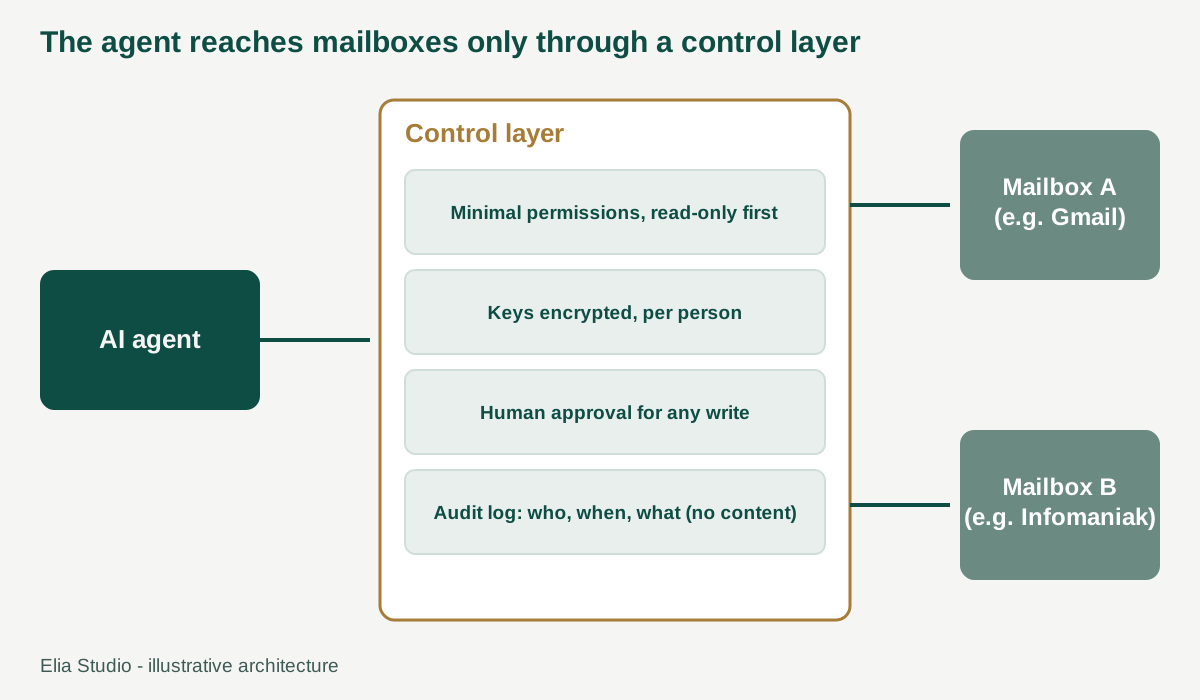
The control layer sits between the agent and each mailbox. It is where permissions, approvals and logs live.
1. Who built the connector, and who maintains it? Several connectors exist for the same mailbox, some official and some built by individuals. For Infomaniak we compared them and kept only the official mail connector published by Infomaniak. Ask who maintains yours and what happens when it breaks.
2. Is it built on something stable? Google's official Gmail connector is a remote MCP server that, as of October 2026, is still in the Workspace Developer Preview Program. It needs your own Google Cloud project and OAuth setup, as the Google documentation explains. We chose not to fake it by wrapping other interfaces. Ask what happens to your project if the provider changes the rules.
3. What exactly can the agent do? Start with reading only. Give the agent the smallest permissions that do the job, as you would for a new hire on day one. Our pilot is reserved for administrators, and the agent does not send emails on its own.
4. Where are the keys kept? Access keys must be encrypted, stored per person (never shared across the company), and out of reach of the AI model. When someone disconnects, the key must also be deleted on your side, not only at Google or Infomaniak. It is the difference between returning a badge and asking the guard to forget about it.
5. Who approves anything that changes something? Reading is safe to automate. Writing is not. In our design, any write needs a human confirmation that works once and applies to that exact action. Anything destructive needs a second check, and downloading attachments is blocked by default. Security teams will recognise the risk class: the OWASP Top 10 for LLM applications includes excessive agency.
6. Is there a visitor log, and does it respect privacy? You want to know who accessed which mailbox, when and why. You do not want a second copy of the emails in the log. We record the access and leave out the content. Your DPO will ask about this, so read the CNIL practical sheets on AI (in French) before the meeting.
7. Does it handle real life: several mailboxes, several providers? People have a Gmail account and a company mailbox. Each should be a separate connection, with search results clearly labelled by mailbox. Ask your expert to show it with two accounts, not one.
The 7 questions at a glance
| # | Ask | Good answer | Red flag |
|---|---|---|---|
| 1 | Who maintains the connector? | Official, named maintainer | “Some open-source one” |
| 2 | How stable is it? | Fallback plan if rules change | No plan |
| 3 | What can the agent do? | Read-only first, minimal rights | “Full access, it is simpler” |
| 4 | Where are the keys? | Encrypted, per person, deleted on revoke | Shared, or in the AI's reach |
| 5 | Who approves changes? | A human, once, per exact action | The agent decides alone |
| 6 | What is logged? | Who, when, what; no content | Nothing, or full copies |
| 7 | Several mailboxes? | Separate, labelled connections | Merged accounts |
What a sovereign, open-core platform changes
When the rules (permissions, approvals, logs, key handling) live in a platform you control, they stay the same whatever mailbox provider you use. That gives you three things:
- Control: you operate the security layer, not the vendor.
- Choice: one mailbox can sit with a US provider and another with a European one, and the agents work the same way.
- Proof: the rules are code you can inspect and audit, not a promise in a brochure.
For a company of about 250 people, this is the difference between a pilot you can show your DPO and one you have to hide from them.
Where we are
Our connectors for Gmail and Infomaniak are a pilot: administrators only, read-only. Next come more users, shared mailboxes and drafting, each behind the same checks. We recommend that sequence to anyone: prove value on reading, then earn the right to write.
Next step
Start with one real use case: a single team, a single mailbox, a read-only agent that prepares something useful. See our services or contact Elia Studio.
Frequently asked questions
- Is it safe to let an AI agent read my email?
- It can be, if it starts read-only, uses the smallest permissions, stores keys encrypted per person, and needs human approval for any change. Ask to see each of these.
- What does MCP change for a company?
- It standardises how agents plug into tools, which lowers integration cost. It does not replace security design, which remains your responsibility.
- Do we need a European provider for email?
- Not necessarily. A control layer you own lets you mix providers and decide per mailbox, based on your data rules.